
Disable/Enable Touchpad in Ubuntu

Co Hein
Contributor
1 min read
ကျွန်တော်တို့ Laptop ကို mouse တပ်ပြီး သုံးတဲ့အခါ အများစုက Touchpad ကို Disable လုပ်ထားချင်မှာပဲ။ ကျွန်တော်တို့ စာရိုက်တဲ့အခါ Touchpad ကိုထိမိရင် ရိုက်နေရင်း ဘယ်ရောက်သွားမှန်းမသိတာတွေ ဘာတွေ တစ်ခါတစ်လေ ဖြစ်ဖူးကြမှာပဲ။
တစ်ချို့ laptop တွေမှာ Touchpad Disable/Enable လုပ်ဖို့ fuction key ပါပေမယ့် မပါတဲ့ laptop တွေအတွက် တော်တော်တိုင်ပတ်တာတွေဖြစ်တယ်။ အဲ့ဒီအတွက် ဖြေရှင်းဖို့ app တွေအများကြီးရှိပါတယ်။ Mouse တပ်လိုက်တာနဲ့ Touchpad ကို auto disable လုပ်ပေးတာမျိုး။ ဖြုတ်လိုက်ရင် Enable ပြန်ဖြစ်တာမျိုး။ ဒါပေမယ့် Wireless mouse အတွက်ကျ အဲ့ဒါက အဆင်မပြေပြန်ဘူး။
ကျွန်တော်ပြောမယ့် နည်းကတော့ အဲ့ဒီလို app ကိုလည်း သွင်းဖို့အဆင်မပြေတဲ့အခါ ဘယ်လို အလွယ်လုပ်ကြမလဲဆိုတာပါ။ အခုနောက်ပိုင်း ကျွန်တော်သုံးနေတဲ့ နည်းတစ်ခုပါ။
ပထမဆုံး ကိုယ့် Touchpad information ကိုအရင်ကြည့်ပါမယ်။ Terminal မှာ xinput လို့ရိုက်လိုက်ပါ။
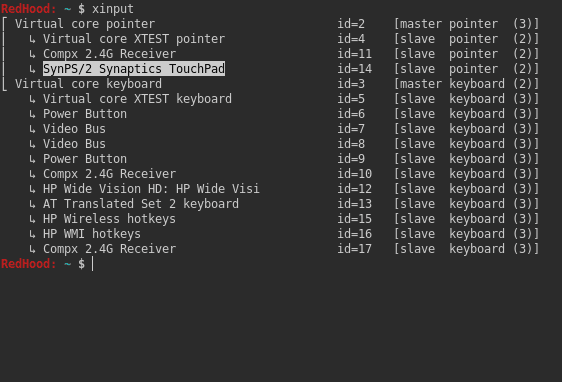
ဒါက ကျွန်တော့်စက်ရဲ့ Touchpad information ပါ။
အဲ့ဒါကို Terminal ကနေ disable လုပ်ကြည့်ပါမယ်။
$ xinput set-prop "SynPS/2 Synaptics TouchPad" "Device Enabled" 0

အဲ့ဒါဆိုရင် Touchpad Disable ဖြစ်သွားပါပြီ။ Enable ပေးချင်ရင် 0 နေရာမှာ 1 ထည့်ပါ။
ပြီးရင် ကျွန်တော်တို့ အဲ့ဒါကို Shortcut ထဲထည့်ပါမယ်။ Settings>>Devices>>Keyaboard ကိုသွားပါ။
Scroll ကို အောက်ဆုံးထိဆွဲသွားပါ။ Custom Shortcut ဆိုတာတွေ့ပါမယ်။ “+” sign ကိုနှိပ်လိုက်ပါ။
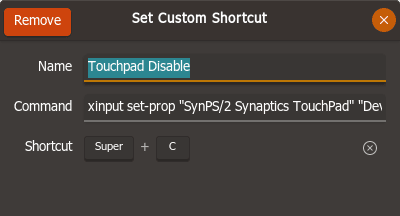
ဒါကတော့ ကျွန်တော်ပေးတဲ့ပုံစံပါ။ Shortcut မှာ ကိုယ်အဆင်ပြေတဲ့ keys ထားလို့ရပါတယ်။
Command မှာ
xinput set-prop "SynPS/2 Synaptics TouchPad" "Device Enabled" 0
Enable တွက်က
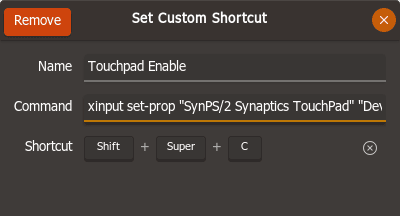
Command မှာ
xinput set-prop "SynPS/2 Synaptics TouchPad" "Device Enabled" 1
ထားပါ။
ကျွန်တော့်စက်ဆိုရင်တော့ Super+C ဆိုရင် Disable နဲ့ Shift+Super+C ဆိုရင် Enable ပါ။
More in Tutorials

Git multi account
Developer အတော်များများဟာ Email တခုနဲ့ ssh key ၂ ခု ၃ ခုလောက်ထပ် ပိုသုံးကြလေ့ မရှိပါဘူး။ Personal Development နဲ့ Contract Project တွေ Freelance Project တွေမှာ အကောင့်တခု အီးမေးလ်…
 Ko Ko Ye
4 min read
Packet tracer 7.2.2 installation on Ubuntu (libpng12.so.0 – solved)
ပထမဆုံး https://www.netacad.com/courses/packet tracer ကနေပြီးတော့ packet tracer course ကို enroll လုပ်ပြီး packet tracer ကိုဒေါင်းလုတ် လုပ်ပါ.. အဲ့ကနေ မ down တက်ရင်လဲ…
 Khant Phyo
2 min read

Re-enable right click button in Touchpad Ubuntu 18.04
သတိထားမိကွမလား မသိဘူး။ Ubuntu 18.04 ရဲ့ Touchpad မှာ right click button အလုပ်မလုပ်တော့ပါဘူး။ Right click ကို သုံးချင်ရင် 2 fingers နဲ့ touch ရပါတယ်။ အရင် version တွေမှာတော့ 2…
 Co Hein
1 min read